
Cross-platform workflow
Shorts, Reels and TikTok: One Master, Three Current Checks
Build one clean vertical master in FreeCut, then adapt it for Shorts, Reels and TikTok: concrete steps, calculated file sizes and fixes for common failures.
Shorts, Reels and TikTok all play vertical video, yet they are three separate destinations with three independently changing rule sets. Overlay layout, supported durations and upload processing are documented by each platform and revised without notice. The workflow that survives those revisions is simple: build one clean master in FreeCut, then produce a checked delivery copy for each platform on the day you upload.
Instead of abstract method talk, this guide walks the whole path with one concrete example: a 58 second vertical clip recorded on an iPhone at 1080 x 1920 and 30 fps, with one music track and two text overlays.
Build the master around the story, not around buttons
Import the recording from Photos into a FreeCut project and place it on the video track of the timeline. Trim the raw 63 seconds down to 58 by cutting the fumbled opening. Add two elements on the text track: a title that runs from second 0 to second 3, and a short label at second 41 that names the product on screen. Keep both comfortably inside the frame instead of pushing them toward the edges, because every platform draws its own interface over the edges.
Put the music on the audio track and keep the clip's own recorded audio linked to the video so speech stays in sync while you cut. Style the title once with font, outline and background so it reads on bright and dark footage alike. What you deliberately leave out matters just as much: no platform logo, no baked-in follow request, no ending that only makes sense on one service.
Check each destination on delivery day
| YouTube Shorts | Check the current YouTube Help page for eligibility and upload guidance |
| Instagram Reels | Check the current Meta placement guide and the in-app preview |
| TikTok | Check the current TikTok documentation for the exact organic or paid placement |
| All three | Treat help pages as format sources, never as reach promises |
Duration limits, safe margins and accepted formats are documented by the platforms themselves and change independently, which is why this article deliberately prints no fixed numbers for them. The sources linked below are the places to check, on the date you upload. Ignore folklore such as one platform rewarding a bitrate or punishing a frame rate; no help page documents that.
Produce a delivery copy: the concrete steps
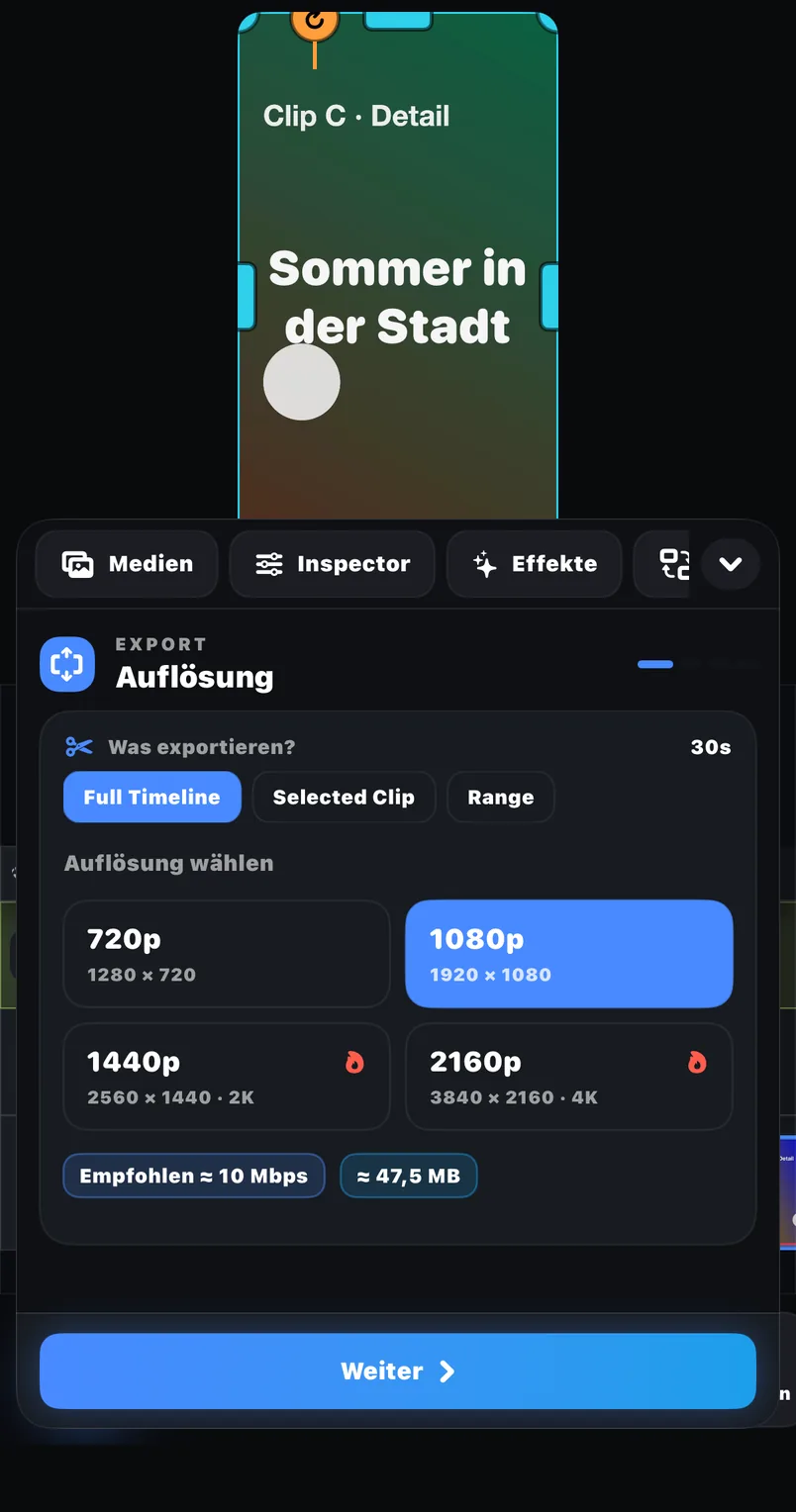
- 01Reopen the master project in FreeCut. Do not import the exported master file.
- 02Reword the ending text for this platform. Select the text element, edit the wording, and adjust font, outline, background and shadow if the new text needs a different treatment.
- 03Use the eye toggle in the track header to hide any text track that belongs to a different platform version, and the speaker toggle to mute an audio track this version should not carry. Both switches affect the export, so what you see and hear is what you ship.
- 04Open the export panel and pick the scope: full timeline for the complete cut, selected clip to ship a single element, or a range such as second 0 to 20 for a teaser.
- 05Set FPS, bitrate and codec, watch the estimated file size readout update, then export and save to Photos or Files.
- 06Play the saved copy on the phone with sound on before uploading it.
How big will the file be? The math
You can plan file sizes before exporting with two formulas. Video bitrate is width times height times frame rate times bits per pixel, where 0.10 bits per pixel is a reasonable planning value for typical footage. File size is video bitrate plus roughly 192 kbps of audio, multiplied by duration in seconds, divided by 8 to convert bits into bytes.
For the example master: 1080 x 1920 x 30 x 0.10 is roughly 6.2 Mbps. Across 58 seconds that gives (6.2 + 0.192) x 58 / 8, which is about 46 MB. The same math produces this planning table.
| 1080 x 1920, 30 fps, 0.10 bpp | about 6.2 Mbps video; a 60 s clip is about 48 MB (calculated) |
| 1080 x 1920, 30 fps, 0.15 bpp | about 9.3 Mbps video; a 60 s clip is about 71 MB (calculated) |
| 1080 x 1920, 60 fps, 0.10 bpp | about 12.4 Mbps video; a 60 s clip is about 95 MB (calculated) |
| 20 s teaser range at 6.2 Mbps | about 16 MB (calculated) |
Common failure modes and their fixes
- Essential text sits under a platform overlay. Fix: in the delivery copy, select the text element in the preview and move or resize it; the master stays untouched.
- A track meant for another platform ships by accident. Fix: check every eye and speaker toggle in the track headers before export, then verify the saved file with sound on.
- The exported copy is shorter than expected. Fix: the export scope was set to a selected clip or a range; reopen the export panel and choose the full timeline.
- Quality degrades across platform versions. Fix: you edited an exported file; always return to the master project instead.
- A follow request meant for one platform appears on another. Fix: keep every call to action as its own text element so it can be hidden or reworded per copy.
When one master is not enough
The single-master workflow assumes the story is identical everywhere and only text, ending or export scope differ. Build separate projects when the target durations drift so far apart that the pacing changes, when one platform version needs a different sound plan, or when the opening has to hook differently. A second cut is cheaper than one overloaded timeline where half the tracks are permanently hidden.
Document what changed
- Official source and review date recorded for each platform.
- Text moves and rewording noted per delivery copy.
- Export scope, FPS, bitrate, codec and estimated size recorded.
- Saved output played on a phone with sound before upload.
- Master project preserved unchanged.
A fixed table of platform specs starts aging the day it is published. This process does not: it tells you where to look, what to change in FreeCut and how to verify the result, whichever platform rewrites its rules next.
Sources and review basis
Product version: FreeCut 1.3Reviewed on 2026-07-20
About the editorial team
The FreeCut editorial team is part of LKS E-Commerce GmbH in Wuppertal — the same team that builds FreeCut. Every guide is reproduced in the app, product claims are limited to the public App Store listing, and every page carries a review date.
Keep reading
Instagram Reels Export: A Placement-Aware Review Process
Concrete Reels export walkthrough in FreeCut 1.3: FPS, bitrate, codec, calculated file sizes, a range test and common failure fixes, without preset myths.
A Source-First TikTok Export Checklist
A worked TikTok export example for FreeCut 1.3: source checks, a calculated bitrate and file-size table, and a step-by-step walk through the export panel.
FreeCut and CapCut: A Neutral Task-Based Comparison
Compare the current public product pages and run the same small project in both editors instead of relying on unsupported allegations or feature counts.
Cut your next video in FreeCut.
Export the selected scope without a forced FreeCut watermark, then inspect the saved file before publishing.