
Comparison method
FreeCut and CapCut: A Neutral Task-Based Comparison
Compare the current public product pages and run the same small project in both editors instead of relying on unsupported allegations or feature counts.
A fair editor comparison needs a date, public sources and a task. Vendor ownership, policy, price and features can change; community reports may describe another region or build. This article therefore avoids claims about bans, secret ranking behavior, cloud processing or licence terms that are not directly established by the two current product pages used for the comparison.
Write down the job before choosing an editor
A creator cutting one interview has different needs from a team sharing templates. Define source types, expected timeline complexity, text requirements, export destination and whether a forced editor mark is acceptable. This prevents the comparison from becoming a list where every feature counts equally.
- Same original source files for both tests.
- Same target duration and visual sequence.
- Same text content and approximate placement.
- Comparable export scope and destination requirement.
- Saved outputs reviewed on the same display.
What FreeCut 1.3 publicly documents
FreeCut's public listing names Photos, Files, Camera and Audio import; a multi-track timeline; visual, audio and sync modes; styled text; move, scale, rotation and resize; keyframes; linked audio/video; track visibility and speaker controls; full, clip and range export; FPS, bitrate, codec and file-size controls; Photos or Files output; and no forced watermark. Pro removes ads and is listed as monthly or yearly.
Read CapCut's current page separately
Open the current CapCut App Store page and record what it says in your region on the comparison date. Do not copy an old feature table or assume that an account, watermark, template or subscription behaves identically across builds and countries.
Run one controlled project
- 01Import the same short video and audio sources into both editors.
- 02Build the same sequence and add the same title.
- 03Record the number of unclear steps, interruptions and workarounds rather than subjective speed alone.
- 04Export the same intended section with comparable source-aware settings.
- 05Inspect both saved files for text, motion, sync, ending and editor-added branding.
Score what matters to your workflow
| Source handling | Can the approved media enter without a conversion detour? |
| Timeline clarity | Can you understand picture, text and audio relationships? |
| Export control | Can you see and document the relevant output choices? |
| Saved result | Does the file match the intended picture, audio and branding? |
| Purchase clarity | Can you identify the exact local offer before buying? |
A concrete test project you can copy
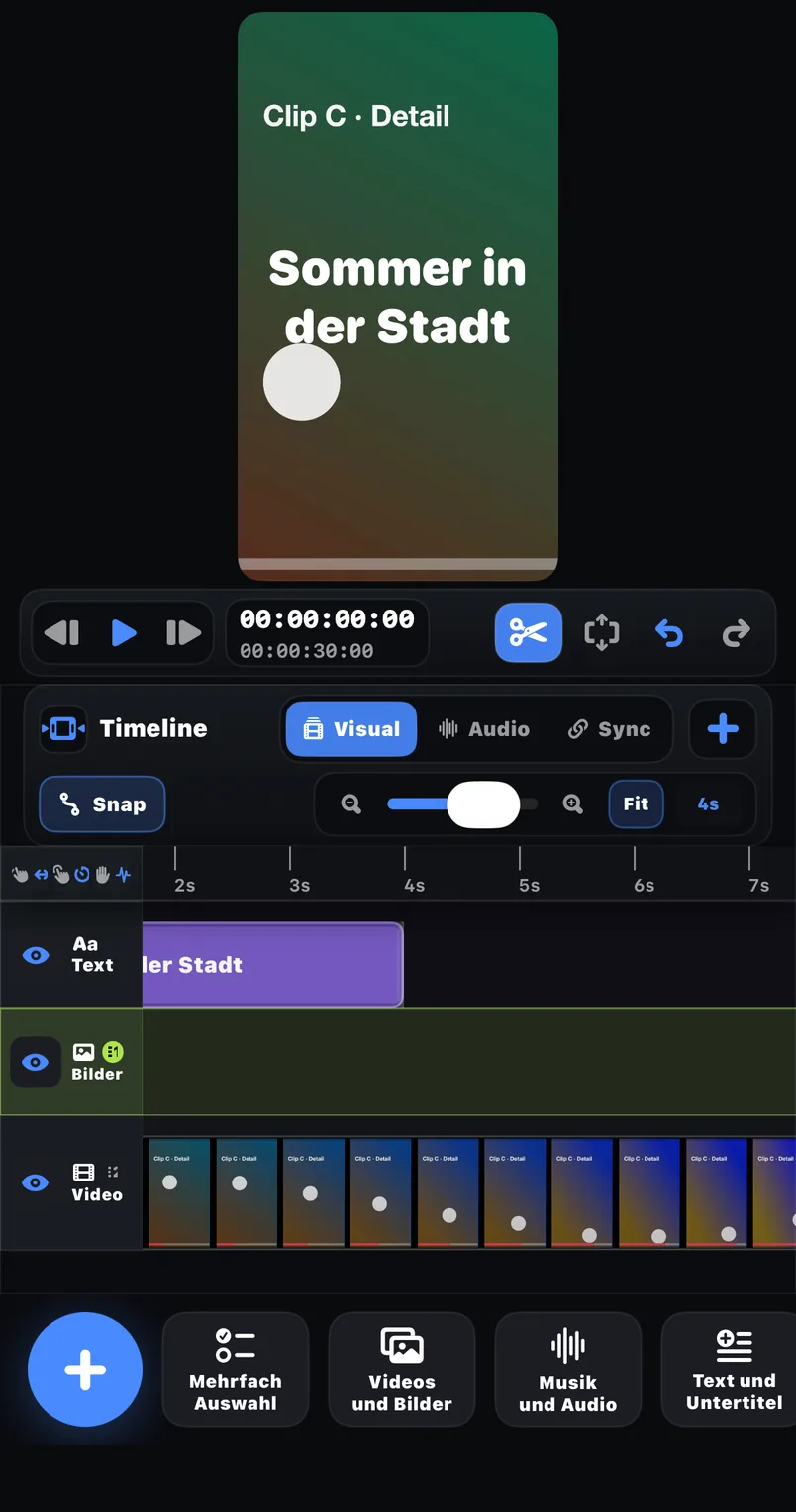
To make the protocol reproducible, here is a complete example specification. Record two clips yourself: a 25-second wide shot and a 15-second detail shot, both 1080 x 1920 at 30 fps, plus one music track around 60 seconds. The task: cut a 40-second sequence that opens on the wide shot, switches to the detail shot at second 12, carries one title in the upper third from second 2 to second 8, and ends on a held final frame. This is small enough to finish in fifteen minutes per editor and large enough to touch import, timeline, text, audio and export in both apps.
In FreeCut 1.3 the walkthrough looks like this: import both clips and the music from Photos or Files; arrange them on the multi-track timeline; trim the cut point at second 12; add the text layer and style font, outline and background; check the track headers so the music track's speaker toggle is on and every visual track's eye is on; then open the export panel, select the range scope for the 40-second sequence, and read FPS, bitrate, codec and the estimated file size before saving to Photos. Every step above names a control the public listing documents, so you can verify the description against the store page before trusting it.
Log numbers, not impressions
Subjective speed is the least reliable measurement in an editor comparison, because familiarity dominates it. Count events instead. How many times did you have to leave the app or open a help page? How many interruptions appeared between opening the project and saving the export? How many steps did the text styling take from tapping the title to the finished look? Write the numbers down for both editors in the same session, while the memory is fresh.
| Unclear steps | Moments where the next action was not discoverable without searching |
| Interruptions | Anything that blocked editing until you reacted to it |
| Steps to styled title | Taps from creating the text layer to the finished look |
| Export transparency | Which output values were visible before saving (FPS, bitrate, codec, size) |
| Result deviations | Differences between preview and saved file, checked per corner and at the ending |
Compare the offers, not just the apps
Price comparisons age quickly, so anchor them to sources. FreeCut's side is public and simple: the app is free with ads, and Pro removes ads for 3.99 euros per month or 39.99 euros per year, billed through the Apple ID subscription system — the yearly plan works out to about 17 percent less than twelve monthly payments. For CapCut, open the current App Store page in your region on the comparison day and note the listed price structure yourself. Write both down with the date; a comparison table without a date is a rumor in waiting.
Common comparison mistakes
- Comparing an editor you know well against one you opened today, then calling the familiar one faster.
- Using different source files, so encoder and timeline behavior are never actually comparable.
- Judging the preview instead of the saved file — only the export shows branding, ending and sync as viewers will see them.
- Copying feature tables from third-party articles instead of the two current store pages.
- Declaring a universal winner from a single 40-second test project.
Publish a limited conclusion
State the versions, region, task and date. An editor that wins one short phone workflow may not win a collaborative or template-heavy workflow. A narrow conclusion helps readers reproduce the comparison and is more trustworthy than declaring one product universally better.
Sources and review basis
Product version: FreeCut 1.3Reviewed on 2026-07-20
About the editorial team
The FreeCut editorial team is part of LKS E-Commerce GmbH in Wuppertal — the same team that builds FreeCut. Every guide is reproduced in the app, product claims are limited to the public App Store listing, and every page carries a review date.
Keep reading
Shorts, Reels and TikTok: One Master, Three Current Checks
Build one clean vertical master in FreeCut, then adapt it for Shorts, Reels and TikTok: concrete steps, calculated file sizes and fixes for common failures.
Instagram Reels Export: A Placement-Aware Review Process
Concrete Reels export walkthrough in FreeCut 1.3: FPS, bitrate, codec, calculated file sizes, a range test and common failure fixes, without preset myths.
What FreeCut 1.3 Publicly Says About Free and Pro
FreeCut Free vs Pro in concrete numbers: 3.99 EUR monthly or 39.99 EUR yearly for ad removal, break-even math, and everything that stays free including export.
Cut your next video in FreeCut.
Export the selected scope without a forced FreeCut watermark, then inspect the saved file before publishing.