
Accessibility · Text
Readable Captions Without Pretending They Are Automatic
A manual caption workflow for FreeCut 1.3: transcript checks, card timing math, timeline steps, track toggles and a calculated export file size table.
Captions are an accessibility feature, not decoration. A viewer watching with the sound off should be able to follow every spoken sentence and every sound that carries meaning. FreeCut 1.3 publicly documents styled text layers, but not automatic transcription, SRT import or export, or word-level speech timing. This guide therefore describes a manual on-screen text workflow, worked through one concrete example: a 60-second talking-head clip with roughly 150 spoken words, from transcript to exported file.
Start from a checked transcript
Play the clip and type the words exactly as spoken. At a conversational pace, 60 seconds of speech is roughly 130 to 160 words, so the full transcript fits on half a page. Verify names, dates, figures and technical terms against the recording, and mark every pause or topic change, because those pauses become your card boundaries.
- Speech is written down accurately rather than silently paraphrased.
- Important non-speech audio is noted where it affects understanding, for example (door slams).
- Speaker changes are marked when more than one person is heard.
- Names, numbers and quotations have been checked against the recording, not from memory.
Split the transcript into readable cards
A card is one text layer that appears and disappears as a unit. Accessibility guidance such as the linked W3C material recommends short lines and a reading speed the audience can follow. A practical target is one to two lines of about five to eight words each, so the 150-word example becomes roughly 20 to 25 cards, each on screen for two to three seconds. Split at phrase boundaries: a sentence like We tested the battery for two full weeks and it never dropped below 40 percent becomes four cards that each end at a natural pause, not four arbitrary chunks cutting across the grammar.
| 4-word card | at least 1.5 seconds on screen (calculated at 160 words per minute) |
| 6-word card | at least 2.3 seconds (calculated) |
| 8-word card | at least 3.0 seconds (calculated) |
| Two full lines, 12 to 16 words | 4.5 to 6 seconds; usually better split into two cards |
Build the cards on the FreeCut timeline
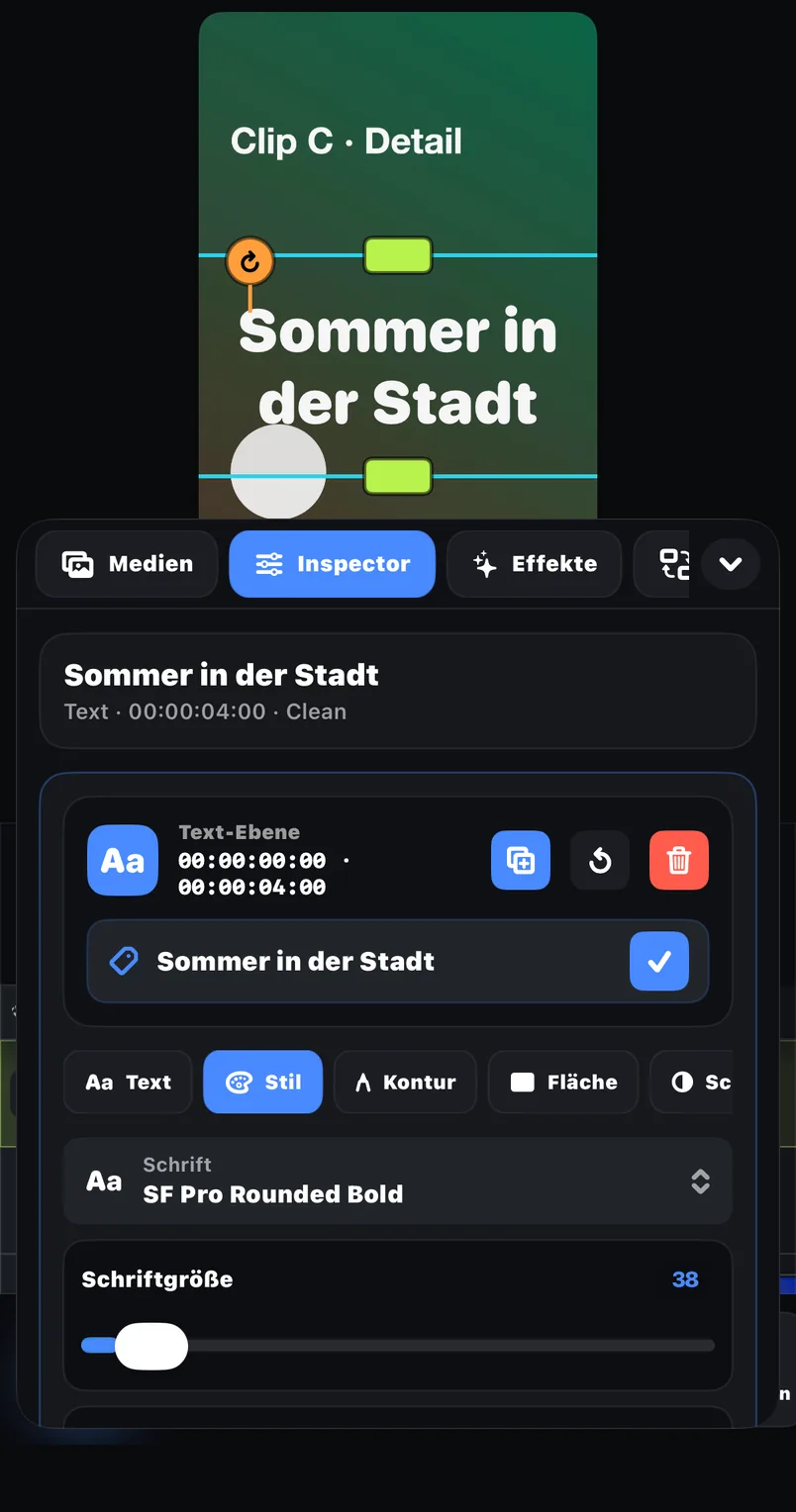
- 01Import the clip from Photos or Files and place it on the timeline.
- 02Add a text layer for the first card. It appears as its own clip on a text track above the video.
- 03Style it once and note the values. Font, style, outline, background, shadow and text-box sizing are documented text styling; a dark semi-transparent background with a light font stays readable over changing footage.
- 04Position the card in the preview by moving and scaling it. Keep it in the lower third, clear of the very bottom edge where platform interfaces draw their own controls.
- 05Trim and move the text clip on the timeline until it starts exactly when the phrase starts and ends when the pause begins.
- 06Add the next card and apply the same style values, so that all 20 to 25 cards look identical.
Use the track toggles for two focused review passes
Each track header on the timeline has an eye toggle for visibility and a speaker toggle for audio, so you can review one question at a time. First pass: speaker toggle off, then watch the whole minute muted; if you cannot finish reading a card before it disappears, it is shown too briefly. Second pass: with audio back on, flip the eye toggle on the text track off and on at a few points to see what the captions cover. If a card hides the speaker's mouth or the product, move it in the preview instead of shrinking the font below readability.
Export a short range before the full timeline
FreeCut 1.3 documents three export scopes: the full timeline, a selected clip, or a range. For caption work, the range test is the cheap safety net. Select about ten seconds containing your smallest text and busiest background, open the export panel, and review FPS, bitrate, codec and the estimated file size readout before rendering. Small crisp text suffers first under heavy compression, because sharp letter edges cost bits; if the test shows fuzzy caption edges, raise the bitrate and export the range again.
The following values are calculated, not measured: video bitrate = width x height x fps x bits per pixel, and file size = (video bitrate + 192 kbps audio) x duration / 8. FreeCut shows its own estimated size in the export panel; treat that readout as authoritative for your settings.
| 1080 x 1920, 30 fps, 0.10 bpp | about 6.2 Mbps video; a 60 s clip is about 48 MB (calculated) |
| 1080 x 1920, 30 fps, 0.15 bpp | about 9.3 Mbps; about 71 MB for 60 s (calculated) |
| 720 x 1280, 30 fps, 0.10 bpp | about 2.8 Mbps; about 22 MB for 60 s (calculated) |
Common failure modes and their fixes
- Cards drift out of sync after a later edit. Trimming or moving the video clip does not re-time your text clips, so re-watch the captioned section after every timeline change.
- White text disappears over a bright sky. Add the documented outline or a background box instead of relying on color alone.
- A card flashes by in under a second. Merge it with its neighbour or extend it; below roughly 1.5 seconds most viewers cannot read it.
- Captions sit where TikTok, Reels or Shorts draw their interface. The platforms document their current layouts; check the current official pages before publishing, because overlay zones change.
- The muted video is still not understandable. That usually points to missing sound descriptions rather than styling; add a card such as (phone buzzes) where the sound carries meaning.
Burned-in text is not a caption file
Text rendered into the video is visible in every player, but it cannot be switched off, resized or read by a screen reader, and it is not a separate caption track. Because the public FreeCut 1.3 description does not document SRT handling, this site does not promise a separate accessibility file from the app.
The final question
After spelling, timing, contrast and coverage, run the muted pass one last time from first frame to last. If a viewer with the sound off can follow the entire minute, the caption work is done; if not, the transcript or card boundaries need another round.
A caption track succeeds when the video makes sense in silence.
Sources and review basis
Product version: FreeCut 1.3Reviewed on 2026-07-20
About the editorial team
The FreeCut editorial team is part of LKS E-Commerce GmbH in Wuppertal — the same team that builds FreeCut. Every guide is reproduced in the app, product claims are limited to the public App Store listing, and every page carries a review date.
Keep reading
Shorts, Reels and TikTok: One Master, Three Current Checks
Build one clean vertical master in FreeCut, then adapt it for Shorts, Reels and TikTok: concrete steps, calculated file sizes and fixes for common failures.
FreeCut and CapCut: A Neutral Task-Based Comparison
Compare the current public product pages and run the same small project in both editors instead of relying on unsupported allegations or feature counts.
Instagram Reels Export: A Placement-Aware Review Process
Concrete Reels export walkthrough in FreeCut 1.3: FPS, bitrate, codec, calculated file sizes, a range test and common failure fixes, without preset myths.
Cut your next video in FreeCut.
Export the selected scope without a forced FreeCut watermark, then inspect the saved file before publishing.